
Clarify the Valentino Coupon Verification Task and Current Evidence Scope
If you're planning to look for Valentino items through fashion-reps, what you really need to confirm isn't whether the page shows the word "discount," but whether the coupon applies to the current item, whether you've met the minimum amount, and whether the discount actually appears in the checkout details. This guide is designed to help you perform a verifiable coupon check before payment.
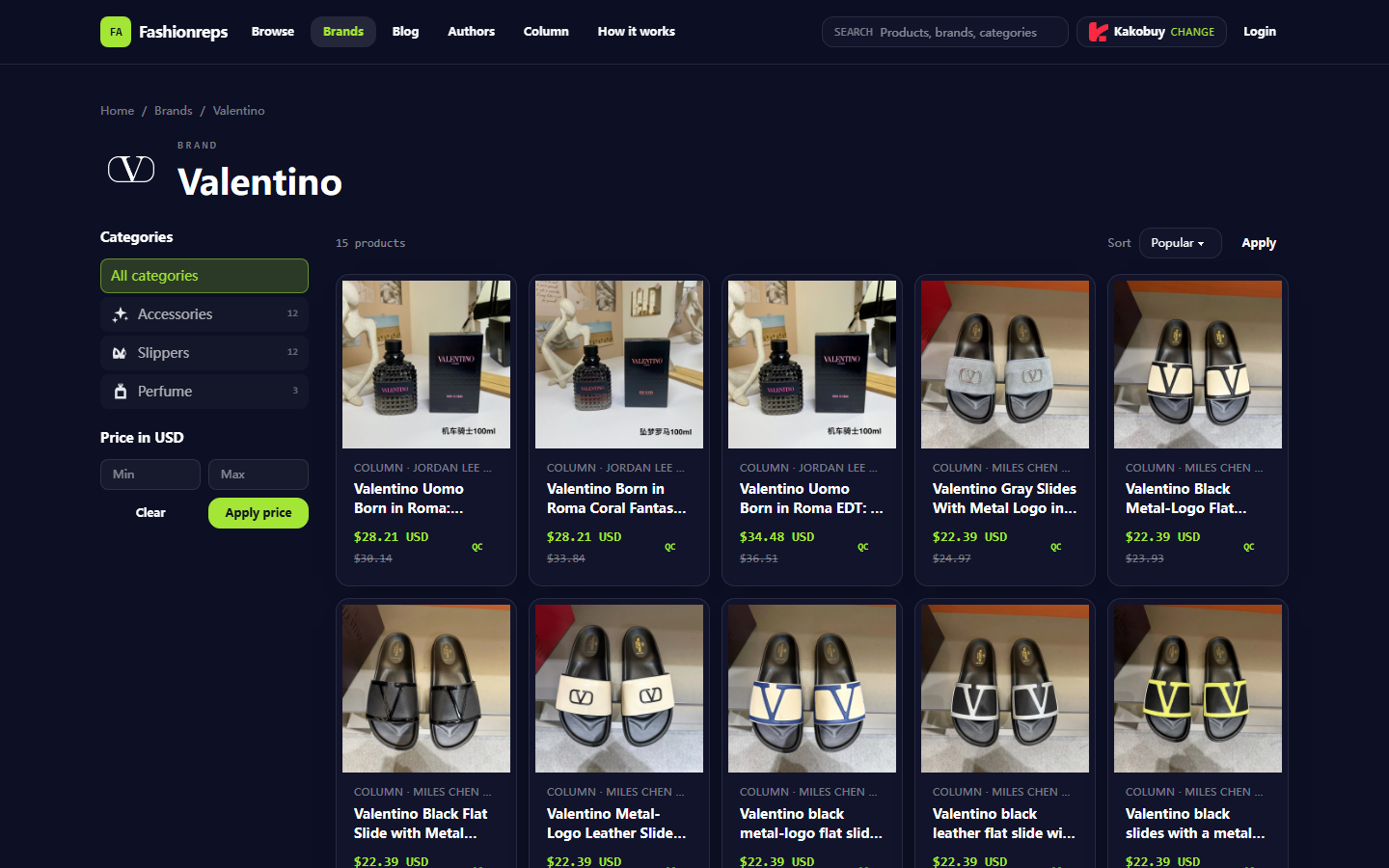
This article only discusses methods for verifying discounts on Valentino items; it does not provide unconfirmed coupon codes, nor does it guarantee that any order will save money. The verification date is October 10, 2026. The currently visible Valentino brand catalog shows items like perfumes and slippers with reference prices; the catalog itself does not provide official discount information sufficient to confirm coupon thresholds, validity periods, brand exclusions, or final checkout discounts. Therefore, the focus below is on evidence recording, amount assessment, and stop conditions. 🔎
After reading, you should be able to:
- Locate the discount entry or promotion details for the current item.
- Determine whether Valentino items fall into applicable categories and are not subject to brand or item exclusions.
- Distinguish item amount from service fees, payment fees, warehousing fees, international shipping, and other order charges.
- Verify the pre-discount amount, discount amount, and post-discount payable amount before submitting payment.
If you have already paid, or the discount only appears in the account page of an external shopping agent, the fashion-reps catalog alone cannot prove whether the discount is valid. Orders, payments, and shipping are handled on the website of the selected shopping agent, so the actual fields on the agent's checkout page should be used as authoritative.
Record Candidate Item Information in the fashionreps Catalog and Product Pages
First, select the item you plan to purchase from the Valentino brand page or site search results. Don't work backwards from an estimated discount, and don't simply add up reference prices of different items and treat that as the final order amount.
The currently visible catalog item information includes item name, category, reference price, some historical reference prices, and size ranges. The visible categories include Accessories, Slippers, and Perfume; some items display reference prices in US dollars. For example, the page shows a Valentino perfume reference price of about 28.21 or 34.48 USD, and some Valentino slippers reference price of about 22.39 USD. These figures can only serve as catalog-level comparison data and should not be considered as the shopping agent's checkout price, price including shipping, or post-discount payable amount.
It's recommended to record the following fields for each candidate item:
- Item name and product page URL.
- Item category, color, size, or capacity.
- Reference price and currency displayed on the page.
- Original reference price or other comparison price shown.
- Whether the item has selectable specifications, stock indicators, or seller differences.
- The item amount that appears again after entering the shopping agent.
Keep screenshots or order draft key fields when recording, but mask account, order number, shipping address, and payment information. 🧾
Verify Coupon Claim Entry, Applicable Categories, and Brand Restrictions
The currently available Valentino catalog evidence is insufficient to confirm the existence of a usable Valentino-specific coupon code or a fashion-reps universal coupon. Therefore, do not infer current discounts based on search result snippets, old screenshots, codes in comments, or other product pages.
Follow this order when verifying:
- Open the currently visible coupon entry and confirm it belongs to the shopping agent or checkout system you actually selected.
- Check whether the coupon description clearly states the applicable site, region, currency, and order type.
- Check whether Valentino is listed as a brand exclusion, or whether the perfume, footwear, or accessories category the item belongs to is excluded.
- Confirm whether the discount is applied automatically, needs to be claimed manually, or requires entering a code at checkout.
- Record the verification time shown on the coupon page. If the page does not show a validity period, activity number, or applicable conditions, it cannot be treated as a confirmed discount.
"Seeing a coupon entry" does not mean "Valentino items are eligible." If the page only shows generic promotion banners without brand, category, and order conditions, the next step is to verify in the actual order draft rather than paying directly. ✅
Record Minimum Amount, Validity, Exclusions, and Stacking Conditions
The core conditions of a coupon include at least the minimum spend, validity period, applicable items, applicable region, usage limit, and stacking rules. If any of these are missing, the status should be recorded as "to be confirmed" rather than "usable."
You can organize information using the following verification table:
| Verification Field | What to Confirm | What to Do If Unable to Confirm |
|---|---|---|
| Minimum amount | Calculated based on item amount or order subtotal | Do not simply add up multiple reference prices as proof of meeting threshold |
| Validity period | Start time, end time, and time zone | Stop using if expired or time not stated |
| Exclusions | Whether Valentino, perfume, footwear, accessories, or specific sellers are excluded | Refer to activity original text or checkout notice |
| Stacking conditions | Can it be combined with store discounts, agent promotions, or other coupons | Treat as non-stackable if not specified |
| Usage limit | Limits per account, order, or activity period | Do not repeatedly submit orders to test |
| Refund impact | How discount is recalculated after cancellation or partial refund | Check refund policy before placing order |
Pay special attention to the amount basis for "minimum spend." Some discounts only count the item subtotal and exclude international shipping, payment processing fees, or insurance; others may count the payable amount as defined by the agent's website. If the activity page does not specify, you cannot use the total including shipping to prove that the threshold has been met.
Distinguish Item Price, Service Fees, Payment Fees, and Other Order Charges
The reference prices in the Valentino catalog only help you understand the displayed item amounts. An actual order usually includes purchasing service fees, domestic shipping, warehousing or handling fees, payment processing fees, international shipping, insurance, and destination country taxes, among other items.
You should break the order amount into several layers:
- Item subtotal: the actual item amount for the current item and selected specifications.
- Agent or service fees: purchasing, handling, or other service fees charged by the selected shopping agent.
- Domestic charges: domestic shipping that may occur when the seller ships to the warehouse.
- Warehouse charges: inspection, storage, consolidation, or other handling fees, as listed on the checkout page.
- International shipping and insurance: charges related to shipping line, weight, volume, and insurance options.
- Payment and exchange rate costs: payment channel fees, currency conversion differences, or other settlement costs.
- Destination country taxes: fees determined by destination regulations, declaration information, and actual customs clearance.
If the discount only reduces the item subtotal, it will not automatically lower international shipping or destination taxes. If a discount amount appears next to the order total without a corresponding discount field, expand the fee details to confirm exactly which charge the discount offsets. Don't add unnecessary items to meet the threshold, as additional items also increase item cost, parcel value, and potential shipping or customs risks. 📦
How to Verify Discount Status and Actual Deduction Fields Before and After Checkout
After entering the order draft on the shopping agent, do not pay yet. Record the item name, specifications, item amount, coupon name or code, discount amount, shipping cost, and final payable amount item by item.
Follow this process for verification:
- Confirm the item in the cart is indeed the target Valentino item, not a different item with a similar name or different specifications.
- Check that the coupon status is claimed, selected, applied, or another clear status.
- Record the pre-discount item subtotal and confirm it meets the minimum amount.
- Expand the fee details to look for discount amount, discount amount, or coupon deduction fields.
- Recalculate: pre-discount applicable amount minus actual discount amount should equal post-discount applicable amount.
- Check that shipping, service fees, payment fees, and taxes are not mistakenly counted as discounts.
- If you change quantity, specifications, agent, shipping line, or delivery method, re-verify the discount status.
- Save an order summary without personal sensitive information before payment; after payment, confirm the final record with order details.
If the discount appears only in the cart but disappears on the payment page, the payment page takes precedence and you should stop payment. If it shows "discount applied" but the discount amount is 0, or the amount does not match the activity description, contact the shopping agent's customer service first; do not test by repeatedly submitting orders. 🛑
Verification Process and Stop Conditions When No Current Official Discount Information Exists
When there is no verifiable current official discount information, the safest approach is to mark this purchase as "no confirmed discount" and evaluate whether it's still worth buying at the undiscounted price. You can continue checking, but you cannot write potential activity as actual savings.
Use the following verification path:
- First check the coupon center, activity details, and applicable item descriptions in the shopping agent's account.
- Then add the Valentino item to the order draft and see if the system automatically lists available discounts.
- Compare item subtotal, currency, region, time, and exclusions with the discount rules.
- If the system shows a discount, confirm a clear discount amount field on the checkout page.
- If the page prompts you to contact customer service, keep the activity name, product page information, and an order summary without sensitive information.
- Do not enter payment information or submit irreversible payment actions until customer service confirms.
Stop counting the discount in your budget if any of the following occurs:
- Only old screenshots or third-party hearsay, without a current activity page.
- Coupon code source is unknown, or the page does not show the scope of application.
- Valentino or specific item categories are not clearly written in the applicable items.
- The calculation basis for the minimum amount is unclear.
- The discount changes between cart and payment page.
- The discount amount cannot be matched with order details.
- The so-called discount can only be obtained by splitting orders, under-declaring, evading checks, or other non-compliant methods.
In these cases, giving up the discount does not mean the order has failed; it means avoiding uncertain amounts and potential compliance risks in the payment process.
Valentino Pre-Order Coupon Checklist and Next Steps
Before placing an order, use this simplified checklist for final confirmation:
- [] Confirmed item name, specifications, and actual item amount.
- [] Confirmed coupon entry belongs to the currently used shopping agent.
- [] Verified the calculation basis for minimum amount.
- [] Checked exclusions such as Valentino, perfume, footwear, or accessories.
- [] Confirmed validity period, currency, region, and usage limit.
- [] Confirmed whether it can be stacked with other activities.
- [] Seen a clear discount amount on the checkout page.
- [] Distinguished item discount from service fees, payment fees, shipping, and taxes.
- [] Saved an order summary without personal information.
Savings should be calculated based on the actual discount amount shown on the checkout page, not on historical reference prices or expected discounts from the catalog. Main risks include: buying unnecessary items to meet the threshold, increased parcel value or shipping costs due to consolidation, budget overruns after discount expiry, and mistaking destination country taxes for platform discounts.
This verification method is suitable for users preparing to purchase one or more Valentino items and needing to compare checkout results from different shopping agents. It is not recommended to proceed with an order when discount conditions are opaque, there is no actual deduction field on the payment page, or when non-compliant declaration methods are required. If there is no official and verifiable discount information currently, the safest next step is to recalculate the complete order cost at the undiscounted price before deciding whether to buy.
Agent Platform Shopping FAQ
1. What should I do if I'm unhappy with the item I received via uufinds.tips?
Reach out to uufinds.tips customer service without delay. Many regular items from Chinese sellers have a 5-day unconditional return and exchange window. You can ask for a return if unsatisfied. If the package has already been delivered to you and you notice a defect, contact uufinds.tips support so they can help you communicate with the seller to work out compensation.
Customer service emails by platform:
kakobuy: service@kakobuy.com
oopbuy: support01@oopbuy.com
usfans: support@usfans.com
hipobuy: care@hipobuy.com
superbuy: care@superbuy.com
2. How can I look up a product I'm interested in on uufinds.tips?
You may search with one keyword or head straight to the category section, which also sorts products by brand. Compared to shorter queries, longer ones usually give fewer but more accurate results.
For instance, try "Air Force 1 White," "sneakers," or just "Air Force 1."
3. What kinds of goods are available on uufinds.tips?
The site covers a wide array of categories such as shoes, T-shirts, sweaters, hoodies, jeans, sweatpants, shorts, beach shorts, factory clearance items, down jackets, baseball jerseys, shirts, hats, jewelry, bags, electronics, sunglasses, socks, underwear, and trendy collectibles.